Llamadas desde el servidor
Esta página fue traducida por PageTurner AI (beta). No está respaldada oficialmente por el proyecto. ¿Encontraste un error? Reportar problema →
Puede que necesites llamar a tus procedimientos directamente desde el mismo servidor donde están alojados. Para esto puedes usar createCallerFactory(). Esto es útil para llamadas desde el servidor y para pruebas de integración de tus procedimientos tRPC.
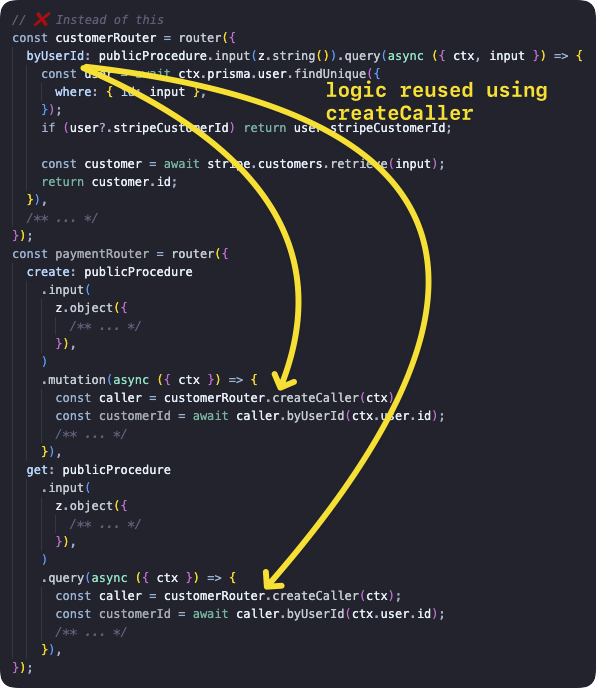
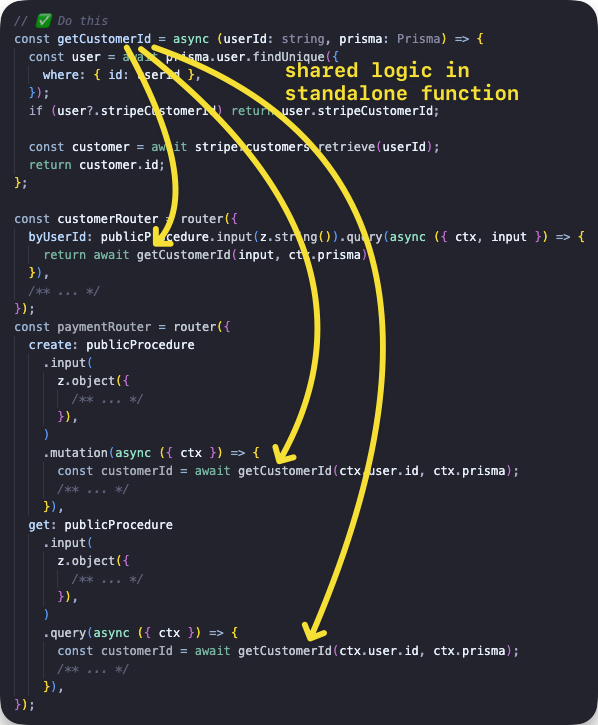
No se debe usar createCaller para llamar procedimientos desde dentro de otros procedimientos. Esto genera sobrecarga al (potencialmente) crear el contexto nuevamente, ejecutar todos los middlewares y validar el input, todo lo cual ya fue realizado por el procedimiento actual. En su lugar, deberías extraer la lógica compartida en una función separada y llamar a esa función desde dentro de los procedimientos, así:
Crear un llamador
Con la función t.createCallerFactory puedes crear un llamador del lado del servidor para cualquier router. Primero llamas a createCallerFactory con el router que quieres llamar como argumento, luego esto devuelve una función donde puedes pasar un Context para las llamadas posteriores a procedimientos.
Ejemplo básico
Creamos el router con una query para listar posts y una mutación para añadir posts, y luego llamamos a cada método.
tsinitTRPC } from '@trpc/server';import {z } from 'zod';typeContext = {foo : string;};constt =initTRPC .context <Context >().create ();constpublicProcedure =t .procedure ;const {createCallerFactory ,router } =t ;interfacePost {id : string;title : string;}constposts :Post [] = [{id : '1',title : 'Hello world',},];constappRouter =router ({post :router ({add :publicProcedure .input (z .object ({title :z .string ().min (2),}),).mutation ((opts ) => {constpost :Post = {...opts .input ,id : `${Math .random ()}`,};posts .push (post );returnpost ;}),list :publicProcedure .query (() =>posts ),}),});// 1. create a caller-function for your routerconstcreateCaller =createCallerFactory (appRouter );// 2. create a caller using your `Context`constcaller =createCaller ({foo : 'bar',});// 3. use the caller to add and list postsconstaddedPost = awaitcaller .post .add ({title : 'How to make server-side call in tRPC',});constpostList = awaitcaller .post .list ();
tsinitTRPC } from '@trpc/server';import {z } from 'zod';typeContext = {foo : string;};constt =initTRPC .context <Context >().create ();constpublicProcedure =t .procedure ;const {createCallerFactory ,router } =t ;interfacePost {id : string;title : string;}constposts :Post [] = [{id : '1',title : 'Hello world',},];constappRouter =router ({post :router ({add :publicProcedure .input (z .object ({title :z .string ().min (2),}),).mutation ((opts ) => {constpost :Post = {...opts .input ,id : `${Math .random ()}`,};posts .push (post );returnpost ;}),list :publicProcedure .query (() =>posts ),}),});// 1. create a caller-function for your routerconstcreateCaller =createCallerFactory (appRouter );// 2. create a caller using your `Context`constcaller =createCaller ({foo : 'bar',});// 3. use the caller to add and list postsconstaddedPost = awaitcaller .post .add ({title : 'How to make server-side call in tRPC',});constpostList = awaitcaller .post .list ();
Ejemplo de uso en una prueba de integración
Tomado de https://github.com/trpc/examples-next-prisma-starter/blob/main/src/server/routers/post.test.ts
ts
ts
router.createCaller()
router.createCaller() ha quedado obsoleto y será eliminado en la v11 o v12 de tRPC.
Con la función router.createCaller({}) (donde el primer argumento es Context) obtenemos una instancia de RouterCaller.
Ejemplo de query con input
Creamos el router con una query que recibe input, y luego llamamos al procedimiento asíncrono greeting para obtener el resultado.
tsinitTRPC } from '@trpc/server';import {z } from 'zod';constt =initTRPC .create ();constrouter =t .router ({// Create procedure at path 'greeting'greeting :t .procedure .input (z .object ({name :z .string () })).query ((opts ) => `Hello ${opts .input .name }`),});constcaller =router .createCaller ({});constresult = awaitcaller .greeting ({name : 'tRPC' });
tsinitTRPC } from '@trpc/server';import {z } from 'zod';constt =initTRPC .create ();constrouter =t .router ({// Create procedure at path 'greeting'greeting :t .procedure .input (z .object ({name :z .string () })).query ((opts ) => `Hello ${opts .input .name }`),});constcaller =router .createCaller ({});constresult = awaitcaller .greeting ({name : 'tRPC' });
Ejemplo de mutación
Creamos el router con una mutación, y luego llamamos al procedimiento asíncrono post para obtener el resultado.
tsinitTRPC } from '@trpc/server';import {z } from 'zod';constposts = ['One', 'Two', 'Three'];constt =initTRPC .create ();constrouter =t .router ({post :t .router ({add :t .procedure .input (z .string ()).mutation ((opts ) => {posts .push (opts .input );returnposts ;}),}),});constcaller =router .createCaller ({});constresult = awaitcaller .post .add ('Four');
tsinitTRPC } from '@trpc/server';import {z } from 'zod';constposts = ['One', 'Two', 'Three'];constt =initTRPC .create ();constrouter =t .router ({post :t .router ({add :t .procedure .input (z .string ()).mutation ((opts ) => {posts .push (opts .input );returnposts ;}),}),});constcaller =router .createCaller ({});constresult = awaitcaller .post .add ('Four');
Ejemplo de contexto con middleware
Creamos un middleware para verificar el contexto antes de ejecutar el procedimiento secret. A continuación se muestran dos ejemplos: el primero falla porque el contexto no cumple con la lógica del middleware, y el segundo funciona correctamente.
Los middlewares se ejecutan antes de que se llame a cualquier procedimiento.
tsinitTRPC ,TRPCError } from '@trpc/server';typeContext = {user ?: {id : string;};};constt =initTRPC .context <Context >().create ();constprotectedProcedure =t .procedure .use ((opts ) => {const {ctx } =opts ;if (!ctx .user ) {throw newTRPCError ({code : 'UNAUTHORIZED',message : 'You are not authorized',});}returnopts .next ({ctx : {// Infers that the `user` is non-nullableuser :ctx .user ,},});});constrouter =t .router ({secret :protectedProcedure .query ((opts ) =>opts .ctx .user ),});{// ❌ this will return an error because there isn't the right context paramconstcaller =router .createCaller ({});constresult = awaitcaller .secret ();}{// ✅ this will work because user property is present inside context paramconstauthorizedCaller =router .createCaller ({user : {id : 'KATT',},});constresult = awaitauthorizedCaller .secret ();}
tsinitTRPC ,TRPCError } from '@trpc/server';typeContext = {user ?: {id : string;};};constt =initTRPC .context <Context >().create ();constprotectedProcedure =t .procedure .use ((opts ) => {const {ctx } =opts ;if (!ctx .user ) {throw newTRPCError ({code : 'UNAUTHORIZED',message : 'You are not authorized',});}returnopts .next ({ctx : {// Infers that the `user` is non-nullableuser :ctx .user ,},});});constrouter =t .router ({secret :protectedProcedure .query ((opts ) =>opts .ctx .user ),});{// ❌ this will return an error because there isn't the right context paramconstcaller =router .createCaller ({});constresult = awaitcaller .secret ();}{// ✅ this will work because user property is present inside context paramconstauthorizedCaller =router .createCaller ({user : {id : 'KATT',},});constresult = awaitauthorizedCaller .secret ();}
Ejemplo para un endpoint API de Next.js
Este ejemplo muestra cómo usar el llamador en un endpoint API de Next.js. tRPC ya crea endpoints API por ti, así que este archivo solo pretende mostrar cómo llamar un procedimiento desde otro endpoint personalizado.
tsTRPCError } from '@trpc/server';import {getHTTPStatusCodeFromError } from '@trpc/server/http';import {appRouter } from '~/server/routers/_app';import type {NextApiRequest ,NextApiResponse } from 'next';typeResponseData = {data ?: {postTitle : string;};error ?: {message : string;};};export default async (req :NextApiRequest ,res :NextApiResponse <ResponseData >,) => {/** We want to simulate an error, so we pick a post ID that does not exist in the database. */constpostId = `this-id-does-not-exist-${Math .random ()}`;constcaller =appRouter .createCaller ({});try {// the server-side callconstpostResult = awaitcaller .post .byId ({id :postId });res .status (200).json ({data : {postTitle :postResult .title } });} catch (cause ) {// If this a tRPC error, we can extract additional information.if (cause instanceofTRPCError ) {// We can get the specific HTTP status code coming from tRPC (e.g. 404 for `NOT_FOUND`).consthttpStatusCode =getHTTPStatusCodeFromError (cause );res .status (httpStatusCode ).json ({error : {message :cause .message } });return;}// This is not a tRPC error, so we don't have specific information.res .status (500).json ({error : {message : `Error while accessing post with ID ${postId }` },});}};
tsTRPCError } from '@trpc/server';import {getHTTPStatusCodeFromError } from '@trpc/server/http';import {appRouter } from '~/server/routers/_app';import type {NextApiRequest ,NextApiResponse } from 'next';typeResponseData = {data ?: {postTitle : string;};error ?: {message : string;};};export default async (req :NextApiRequest ,res :NextApiResponse <ResponseData >,) => {/** We want to simulate an error, so we pick a post ID that does not exist in the database. */constpostId = `this-id-does-not-exist-${Math .random ()}`;constcaller =appRouter .createCaller ({});try {// the server-side callconstpostResult = awaitcaller .post .byId ({id :postId });res .status (200).json ({data : {postTitle :postResult .title } });} catch (cause ) {// If this a tRPC error, we can extract additional information.if (cause instanceofTRPCError ) {// We can get the specific HTTP status code coming from tRPC (e.g. 404 for `NOT_FOUND`).consthttpStatusCode =getHTTPStatusCodeFromError (cause );res .status (httpStatusCode ).json ({error : {message :cause .message } });return;}// This is not a tRPC error, so we don't have specific information.res .status (500).json ({error : {message : `Error while accessing post with ID ${postId }` },});}};