Appels côté serveur
Cette page a été traduite par PageTurner AI (bêta). Non approuvée officiellement par le projet. Vous avez trouvé une erreur ? Signaler un problème →
Vous pourriez avoir besoin d'appeler vos procédures directement depuis le serveur où elles sont hébergées. La fonction createCallerFactory() permet d'y parvenir. Cela est utile pour les appels côté serveur et pour les tests d'intégration de vos procédures tRPC.
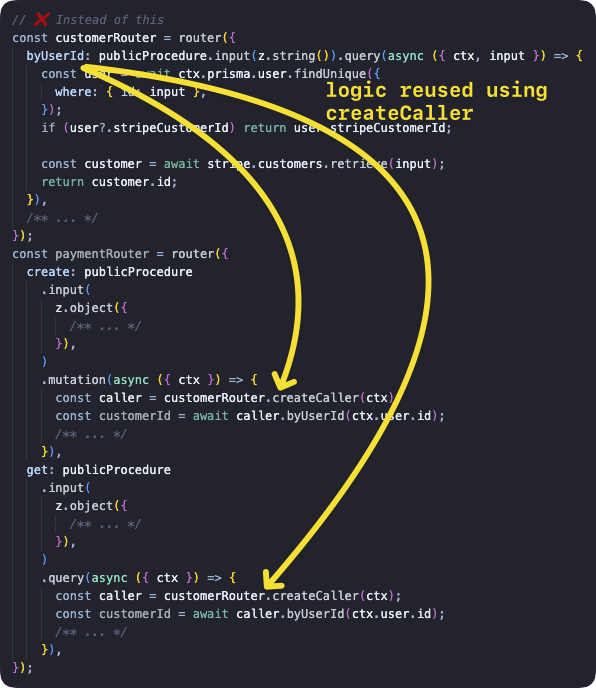
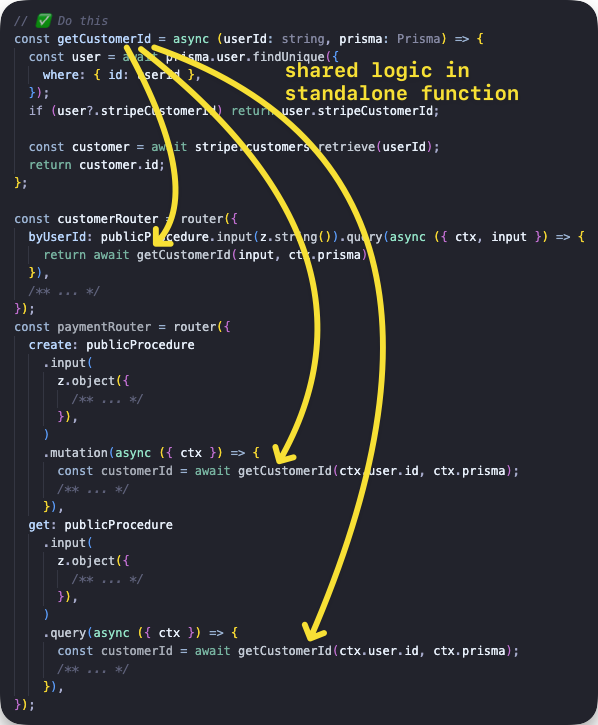
createCaller ne devrait pas être utilisé pour appeler des procédures depuis d'autres procédures. Cela génère une surcharge en (potentiellement) recréant le contexte, exécutant à nouveau tous les middlewares et validant les entrées - opérations déjà effectuées par la procédure actuelle. À la place, extrayez la logique partagée dans une fonction séparée que vous appellerez depuis les procédures, comme ceci :
Créer un appelant
La fonction t.createCallerFactory permet de créer un appelant côté serveur pour n'importe quel routeur. Vous appelez d'abord createCallerFactory avec comme argument le routeur ciblé, ce qui retourne une fonction à laquelle vous pouvez passer un Context pour les appels de procédure ultérieurs.
Exemple basique
Nous créons le routeur avec une requête pour lister les articles et une mutation pour en ajouter, puis nous appelons chaque méthode.
tsinitTRPC } from '@trpc/server';import {z } from 'zod';typeContext = {foo : string;};constt =initTRPC .context <Context >().create ();constpublicProcedure =t .procedure ;const {createCallerFactory ,router } =t ;interfacePost {id : string;title : string;}constposts :Post [] = [{id : '1',title : 'Hello world',},];constappRouter =router ({post :router ({add :publicProcedure .input (z .object ({title :z .string ().min (2),}),).mutation ((opts ) => {constpost :Post = {...opts .input ,id : `${Math .random ()}`,};posts .push (post );returnpost ;}),list :publicProcedure .query (() =>posts ),}),});// 1. create a caller-function for your routerconstcreateCaller =createCallerFactory (appRouter );// 2. create a caller using your `Context`constcaller =createCaller ({foo : 'bar',});// 3. use the caller to add and list postsconstaddedPost = awaitcaller .post .add ({title : 'How to make server-side call in tRPC',});constpostList = awaitcaller .post .list ();
tsinitTRPC } from '@trpc/server';import {z } from 'zod';typeContext = {foo : string;};constt =initTRPC .context <Context >().create ();constpublicProcedure =t .procedure ;const {createCallerFactory ,router } =t ;interfacePost {id : string;title : string;}constposts :Post [] = [{id : '1',title : 'Hello world',},];constappRouter =router ({post :router ({add :publicProcedure .input (z .object ({title :z .string ().min (2),}),).mutation ((opts ) => {constpost :Post = {...opts .input ,id : `${Math .random ()}`,};posts .push (post );returnpost ;}),list :publicProcedure .query (() =>posts ),}),});// 1. create a caller-function for your routerconstcreateCaller =createCallerFactory (appRouter );// 2. create a caller using your `Context`constcaller =createCaller ({foo : 'bar',});// 3. use the caller to add and list postsconstaddedPost = awaitcaller .post .add ({title : 'How to make server-side call in tRPC',});constpostList = awaitcaller .post .list ();
Exemple d'utilisation dans un test d'intégration
Tiré de https://github.com/trpc/examples-next-prisma-starter/blob/main/src/server/routers/post.test.ts
tstestAddAndGetPost () {constctx = awaitcreateContextInner ({});constcaller =createCaller (ctx );constinput :inferProcedureInput <AppRouter ['post']['add']> = {text : 'hello test',title : 'hello test',};constpost = awaitcaller .post .add (input );constbyId = awaitcaller .post .byId ({id :post .id });}
tstestAddAndGetPost () {constctx = awaitcreateContextInner ({});constcaller =createCaller (ctx );constinput :inferProcedureInput <AppRouter ['post']['add']> = {text : 'hello test',title : 'hello test',};constpost = awaitcaller .post .add (input );constbyId = awaitcaller .post .byId ({id :post .id });}
router.createCaller()
La fonction router.createCaller({}) (premier argument = Context) retourne une instance de RouterCaller.
Exemple de requête avec entrée
Nous créons un routeur avec une requête d'entrée, puis appelons la procédure asynchrone greeting pour obtenir le résultat.
tsinitTRPC } from '@trpc/server';import {z } from 'zod';constt =initTRPC .create ();constrouter =t .router ({// Create procedure at path 'greeting'greeting :t .procedure .input (z .object ({name :z .string () })).query ((opts ) => `Hello ${opts .input .name }`),});constcaller =router .createCaller ({});constresult = awaitcaller .greeting ({name : 'tRPC' });
tsinitTRPC } from '@trpc/server';import {z } from 'zod';constt =initTRPC .create ();constrouter =t .router ({// Create procedure at path 'greeting'greeting :t .procedure .input (z .object ({name :z .string () })).query ((opts ) => `Hello ${opts .input .name }`),});constcaller =router .createCaller ({});constresult = awaitcaller .greeting ({name : 'tRPC' });
Exemple de mutation
Nous créons un routeur avec une mutation, puis appelons la procédure asynchrone post pour obtenir le résultat.
tsinitTRPC } from '@trpc/server';import {z } from 'zod';constposts = ['One', 'Two', 'Three'];constt =initTRPC .create ();constrouter =t .router ({post :t .router ({add :t .procedure .input (z .string ()).mutation ((opts ) => {posts .push (opts .input );returnposts ;}),}),});constcaller =router .createCaller ({});constresult = awaitcaller .post .add ('Four');
tsinitTRPC } from '@trpc/server';import {z } from 'zod';constposts = ['One', 'Two', 'Three'];constt =initTRPC .create ();constrouter =t .router ({post :t .router ({add :t .procedure .input (z .string ()).mutation ((opts ) => {posts .push (opts .input );returnposts ;}),}),});constcaller =router .createCaller ({});constresult = awaitcaller .post .add ('Four');
Exemple de contexte avec middleware
Nous créons un middleware pour vérifier le contexte avant d'exécuter la procédure secret. Deux exemples suivent : le premier échoue car le contexte ne correspond pas à la logique du middleware, le second fonctionne correctement.
Les middlewares s'exécutent avant toute procédure appelée.
tsinitTRPC ,TRPCError } from '@trpc/server';typeContext = {user ?: {id : string;};};constt =initTRPC .context <Context >().create ();constprotectedProcedure =t .procedure .use ((opts ) => {const {ctx } =opts ;if (!ctx .user ) {throw newTRPCError ({code : 'UNAUTHORIZED',message : 'You are not authorized',});}returnopts .next ({ctx : {// Infers that the `user` is non-nullableuser :ctx .user ,},});});constrouter =t .router ({secret :protectedProcedure .query ((opts ) =>opts .ctx .user ),});{// ❌ this will return an error because there isn't the right context paramconstcaller =router .createCaller ({});constresult = awaitcaller .secret ();}{// ✅ this will work because user property is present inside context paramconstauthorizedCaller =router .createCaller ({user : {id : 'KATT',},});constresult = awaitauthorizedCaller .secret ();}
tsinitTRPC ,TRPCError } from '@trpc/server';typeContext = {user ?: {id : string;};};constt =initTRPC .context <Context >().create ();constprotectedProcedure =t .procedure .use ((opts ) => {const {ctx } =opts ;if (!ctx .user ) {throw newTRPCError ({code : 'UNAUTHORIZED',message : 'You are not authorized',});}returnopts .next ({ctx : {// Infers that the `user` is non-nullableuser :ctx .user ,},});});constrouter =t .router ({secret :protectedProcedure .query ((opts ) =>opts .ctx .user ),});{// ❌ this will return an error because there isn't the right context paramconstcaller =router .createCaller ({});constresult = awaitcaller .secret ();}{// ✅ this will work because user property is present inside context paramconstauthorizedCaller =router .createCaller ({user : {id : 'KATT',},});constresult = awaitauthorizedCaller .secret ();}
Exemple pour un point de terminaison API Next.js
Cet exemple montre comment utiliser l'appelant dans un point de terminaison API Next.js. tRPC crée déjà des points de terminaison API pour vous, donc ce fichier sert uniquement à illustrer comment appeler une procédure depuis un autre point de terminaison personnalisé.
tsResponseData = {data ?: {postTitle : string;};error ?: {message : string;};};export default async (req :NextApiRequest ,res :NextApiResponse <ResponseData >,) => {/** We want to simulate an error, so we pick a post ID that does not exist in the database. */constpostId = `this-id-does-not-exist-${Math .random ()}`;constcaller =appRouter .createCaller ({});try {// the server-side callconstpostResult = awaitcaller .post .byId ({id :postId });res .status (200).json ({data : {postTitle :postResult .title } });} catch (cause ) {// If this a tRPC error, we can extract additional information.if (cause instanceofTRPCError ) {// We can get the specific HTTP status code coming from tRPC (e.g. 404 for `NOT_FOUND`).consthttpStatusCode =getHTTPStatusCodeFromError (cause );res .status (httpStatusCode ).json ({error : {message :cause .message } });return;}// This is not a tRPC error, so we don't have specific information.res .status (500).json ({error : {message : `Error while accessing post with ID ${postId }` },});}};
tsResponseData = {data ?: {postTitle : string;};error ?: {message : string;};};export default async (req :NextApiRequest ,res :NextApiResponse <ResponseData >,) => {/** We want to simulate an error, so we pick a post ID that does not exist in the database. */constpostId = `this-id-does-not-exist-${Math .random ()}`;constcaller =appRouter .createCaller ({});try {// the server-side callconstpostResult = awaitcaller .post .byId ({id :postId });res .status (200).json ({data : {postTitle :postResult .title } });} catch (cause ) {// If this a tRPC error, we can extract additional information.if (cause instanceofTRPCError ) {// We can get the specific HTTP status code coming from tRPC (e.g. 404 for `NOT_FOUND`).consthttpStatusCode =getHTTPStatusCodeFromError (cause );res .status (httpStatusCode ).json ({error : {message :cause .message } });return;}// This is not a tRPC error, so we don't have specific information.res .status (500).json ({error : {message : `Error while accessing post with ID ${postId }` },});}};
Gestion des erreurs
Les fonctions createCallerFactory et createCaller peuvent recevoir un gestionnaire d'erreurs via l'option onError. Cela permet de lever des erreurs non encapsulées dans une TRPCError, ou de répondre aux erreurs d'une autre manière. Tout gestionnaire passé à createCallerFactory sera appelé avant celui passé à createCaller.
Le gestionnaire est appelé avec les mêmes arguments qu'un formateur d'erreur, à l'exception du champ shape :
tsOnErrorShape {ctx : unknown;error :TRPCError ;path : string | undefined;input : unknown;type : 'query' | 'mutation' | 'subscription' | 'unknown';}
tsOnErrorShape {ctx : unknown;error :TRPCError ;path : string | undefined;input : unknown;type : 'query' | 'mutation' | 'subscription' | 'unknown';}
tsinitTRPC } from '@trpc/server';import {z } from 'zod';constt =initTRPC .context <{foo ?: 'bar';}>().create ();constrouter =t .router ({greeting :t .procedure .input (z .object ({name :z .string () })).query ((opts ) => {if (opts .input .name === 'invalid') {throw newError ('Invalid name');}return `Hello ${opts .input .name }`;}),});constcaller =router .createCaller ({/* context */},{onError : (opts ) => {console .error ('An error occurred:',opts .error );},},);// The following will log "An error occurred: Error: Invalid name", and then throw the errorawaitcaller .greeting ({name : 'invalid' });
tsinitTRPC } from '@trpc/server';import {z } from 'zod';constt =initTRPC .context <{foo ?: 'bar';}>().create ();constrouter =t .router ({greeting :t .procedure .input (z .object ({name :z .string () })).query ((opts ) => {if (opts .input .name === 'invalid') {throw newError ('Invalid name');}return `Hello ${opts .input .name }`;}),});constcaller =router .createCaller ({/* context */},{onError : (opts ) => {console .error ('An error occurred:',opts .error );},},);// The following will log "An error occurred: Error: Invalid name", and then throw the errorawaitcaller .greeting ({name : 'invalid' });