サーバーサイド呼び出し
このページは PageTurner AI で翻訳されました(ベータ版)。プロジェクト公式の承認はありません。 エラーを見つけましたか? 問題を報告 →
同じサーバー内で直接プロシージャを呼び出す必要がある場合、createCallerFactory() を使用して実現できます。これはサーバーサイド呼び出しやtRPCプロシージャの統合テストに有用です。
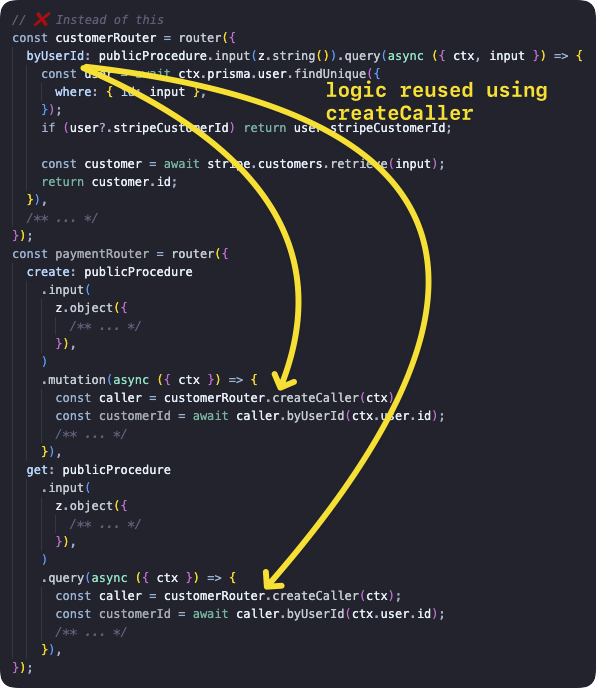
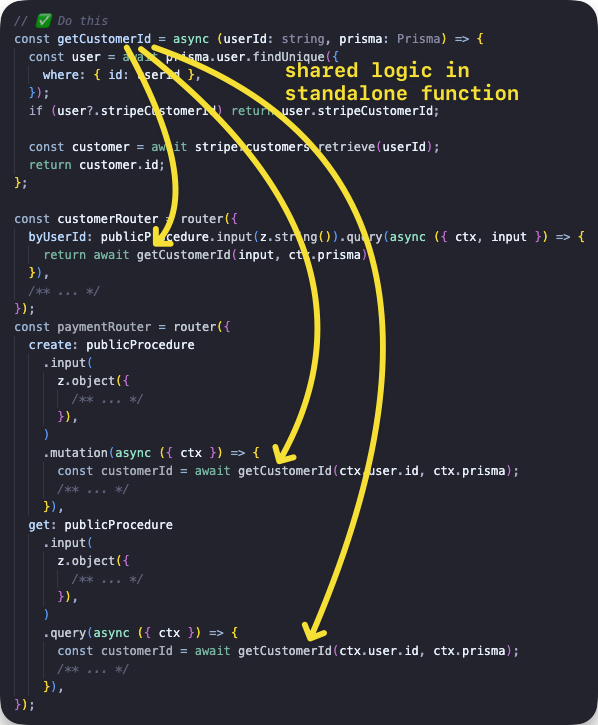
createCallerは他のプロシージャ内からプロシージャを呼び出すために使用すべきではありません。これにより、コンテキストの再作成、全ミドルウェアの実行、入力値の検証といったオーバーヘッドが発生します(可能性あり) - これらの処理は現在のプロシージャですでに完了しているからです。代わりに、共通ロジックを別の関数に抽出し、以下のようにプロシージャ内から呼び出すべきです:
呼び出し元の作成
t.createCallerFactory関数を使用すると、任意のルーターのサーバーサイド呼び出し元を作成できます。まず呼び出したいルーターを引数としてcreateCallerFactoryを呼び出し、返された関数にContextを渡すことで後続のプロシージャ呼び出しが可能になります。
基本的な例
投稿一覧を取得するクエリと投稿を追加するミューテーションを持つルーターを作成し、各メソッドを呼び出します。
tsinitTRPC } from '@trpc/server';import {z } from 'zod';typeContext = {foo : string;};constt =initTRPC .context <Context >().create ();constpublicProcedure =t .procedure ;const {createCallerFactory ,router } =t ;interfacePost {id : string;title : string;}constposts :Post [] = [{id : '1',title : 'Hello world',},];constappRouter =router ({post :router ({add :publicProcedure .input (z .object ({title :z .string ().min (2),}),).mutation ((opts ) => {constpost :Post = {...opts .input ,id : `${Math .random ()}`,};posts .push (post );returnpost ;}),list :publicProcedure .query (() =>posts ),}),});// 1. create a caller-function for your routerconstcreateCaller =createCallerFactory (appRouter );// 2. create a caller using your `Context`constcaller =createCaller ({foo : 'bar',});// 3. use the caller to add and list postsconstaddedPost = awaitcaller .post .add ({title : 'How to make server-side call in tRPC',});constpostList = awaitcaller .post .list ();
tsinitTRPC } from '@trpc/server';import {z } from 'zod';typeContext = {foo : string;};constt =initTRPC .context <Context >().create ();constpublicProcedure =t .procedure ;const {createCallerFactory ,router } =t ;interfacePost {id : string;title : string;}constposts :Post [] = [{id : '1',title : 'Hello world',},];constappRouter =router ({post :router ({add :publicProcedure .input (z .object ({title :z .string ().min (2),}),).mutation ((opts ) => {constpost :Post = {...opts .input ,id : `${Math .random ()}`,};posts .push (post );returnpost ;}),list :publicProcedure .query (() =>posts ),}),});// 1. create a caller-function for your routerconstcreateCaller =createCallerFactory (appRouter );// 2. create a caller using your `Context`constcaller =createCaller ({foo : 'bar',});// 3. use the caller to add and list postsconstaddedPost = awaitcaller .post .add ({title : 'How to make server-side call in tRPC',});constpostList = awaitcaller .post .list ();
統合テストでの使用例
出典: https://github.com/trpc/examples-next-prisma-starter/blob/main/src/server/routers/post.test.ts
ts
ts
router.createCaller()
router.createCaller()は非推奨となり、tRPCのv11またはv12で削除される予定です。
router.createCaller({})関数(第一引数はContext)を使用すると、RouterCallerのインスタンスを取得できます。
入力クエリの例
入力クエリを持つルーターを作成し、非同期のgreetingプロシージャを呼び出して結果を取得します。
tsinitTRPC } from '@trpc/server';import {z } from 'zod';constt =initTRPC .create ();constrouter =t .router ({// Create procedure at path 'greeting'greeting :t .procedure .input (z .object ({name :z .string () })).query ((opts ) => `Hello ${opts .input .name }`),});constcaller =router .createCaller ({});constresult = awaitcaller .greeting ({name : 'tRPC' });
tsinitTRPC } from '@trpc/server';import {z } from 'zod';constt =initTRPC .create ();constrouter =t .router ({// Create procedure at path 'greeting'greeting :t .procedure .input (z .object ({name :z .string () })).query ((opts ) => `Hello ${opts .input .name }`),});constcaller =router .createCaller ({});constresult = awaitcaller .greeting ({name : 'tRPC' });
ミューテーションの例
ミューテーションを持つルーターを作成し、非同期のpostプロシージャを呼び出して結果を取得します。
tsinitTRPC } from '@trpc/server';import {z } from 'zod';constposts = ['One', 'Two', 'Three'];constt =initTRPC .create ();constrouter =t .router ({post :t .router ({add :t .procedure .input (z .string ()).mutation ((opts ) => {posts .push (opts .input );returnposts ;}),}),});constcaller =router .createCaller ({});constresult = awaitcaller .post .add ('Four');
tsinitTRPC } from '@trpc/server';import {z } from 'zod';constposts = ['One', 'Two', 'Three'];constt =initTRPC .create ();constrouter =t .router ({post :t .router ({add :t .procedure .input (z .string ()).mutation ((opts ) => {posts .push (opts .input );returnposts ;}),}),});constcaller =router .createCaller ({});constresult = awaitcaller .post .add ('Four');
ミドルウェアを使用したコンテキストの例
secretプロシージャを実行する前にコンテキストをチェックするミドルウェアを作成します。以下に2つの例を示します:前者はコンテキストがミドルウェアのロジックに合わないため失敗し、後者は正しく動作します。
ミドルウェアはすべてのプロシージャが呼び出される前に実行されます。
tsinitTRPC ,TRPCError } from '@trpc/server';typeContext = {user ?: {id : string;};};constt =initTRPC .context <Context >().create ();constprotectedProcedure =t .procedure .use ((opts ) => {const {ctx } =opts ;if (!ctx .user ) {throw newTRPCError ({code : 'UNAUTHORIZED',message : 'You are not authorized',});}returnopts .next ({ctx : {// Infers that the `user` is non-nullableuser :ctx .user ,},});});constrouter =t .router ({secret :protectedProcedure .query ((opts ) =>opts .ctx .user ),});{// ❌ this will return an error because there isn't the right context paramconstcaller =router .createCaller ({});constresult = awaitcaller .secret ();}{// ✅ this will work because user property is present inside context paramconstauthorizedCaller =router .createCaller ({user : {id : 'KATT',},});constresult = awaitauthorizedCaller .secret ();}
tsinitTRPC ,TRPCError } from '@trpc/server';typeContext = {user ?: {id : string;};};constt =initTRPC .context <Context >().create ();constprotectedProcedure =t .procedure .use ((opts ) => {const {ctx } =opts ;if (!ctx .user ) {throw newTRPCError ({code : 'UNAUTHORIZED',message : 'You are not authorized',});}returnopts .next ({ctx : {// Infers that the `user` is non-nullableuser :ctx .user ,},});});constrouter =t .router ({secret :protectedProcedure .query ((opts ) =>opts .ctx .user ),});{// ❌ this will return an error because there isn't the right context paramconstcaller =router .createCaller ({});constresult = awaitcaller .secret ();}{// ✅ this will work because user property is present inside context paramconstauthorizedCaller =router .createCaller ({user : {id : 'KATT',},});constresult = awaitauthorizedCaller .secret ();}
Next.js APIエンドポイントの例
この例では、Next.js APIエンドポイントで呼び出し元を使用する方法を示しています。tRPCは既にAPIエンドポイントを作成するため、このファイルはカスタムエンドポイントからプロシージャを呼び出す方法を示す目的のみで使用されます。
tsTRPCError } from '@trpc/server';import {getHTTPStatusCodeFromError } from '@trpc/server/http';import {appRouter } from '~/server/routers/_app';import type {NextApiRequest ,NextApiResponse } from 'next';typeResponseData = {data ?: {postTitle : string;};error ?: {message : string;};};export default async (req :NextApiRequest ,res :NextApiResponse <ResponseData >,) => {/** We want to simulate an error, so we pick a post ID that does not exist in the database. */constpostId = `this-id-does-not-exist-${Math .random ()}`;constcaller =appRouter .createCaller ({});try {// the server-side callconstpostResult = awaitcaller .post .byId ({id :postId });res .status (200).json ({data : {postTitle :postResult .title } });} catch (cause ) {// If this a tRPC error, we can extract additional information.if (cause instanceofTRPCError ) {// We can get the specific HTTP status code coming from tRPC (e.g. 404 for `NOT_FOUND`).consthttpStatusCode =getHTTPStatusCodeFromError (cause );res .status (httpStatusCode ).json ({error : {message :cause .message } });return;}// This is not a tRPC error, so we don't have specific information.res .status (500).json ({error : {message : `Error while accessing post with ID ${postId }` },});}};
tsTRPCError } from '@trpc/server';import {getHTTPStatusCodeFromError } from '@trpc/server/http';import {appRouter } from '~/server/routers/_app';import type {NextApiRequest ,NextApiResponse } from 'next';typeResponseData = {data ?: {postTitle : string;};error ?: {message : string;};};export default async (req :NextApiRequest ,res :NextApiResponse <ResponseData >,) => {/** We want to simulate an error, so we pick a post ID that does not exist in the database. */constpostId = `this-id-does-not-exist-${Math .random ()}`;constcaller =appRouter .createCaller ({});try {// the server-side callconstpostResult = awaitcaller .post .byId ({id :postId });res .status (200).json ({data : {postTitle :postResult .title } });} catch (cause ) {// If this a tRPC error, we can extract additional information.if (cause instanceofTRPCError ) {// We can get the specific HTTP status code coming from tRPC (e.g. 404 for `NOT_FOUND`).consthttpStatusCode =getHTTPStatusCodeFromError (cause );res .status (httpStatusCode ).json ({error : {message :cause .message } });return;}// This is not a tRPC error, so we don't have specific information.res .status (500).json ({error : {message : `Error while accessing post with ID ${postId }` },});}};