跳至主内容

认识 tRPC

· 1 分钟阅读
Alex / KATT 🐱
Creator of tRPC
非官方测试版翻译

本页面由 PageTurner AI 翻译(测试版)。未经项目官方认可。 发现错误? 报告问题 →

tRPC 让你在(Node)服务器和客户端之间实现端到端的类型安全,甚至无需声明类型。在服务端只需返回函数数据,前端即可根据端点名称直接使用对应数据。

👋 我是 Alex,GitHub 上的"KATT",今天要介绍一个叫 tRPC 的库。虽然还没发表过相关文章(但 GitHub 已神奇收获 >530 🌟),这篇入门指南算是抛砖引玉。后续将有更多文章和视频教程!想获取更新或提问,欢迎在 Twitter 关注 @alexdotjs

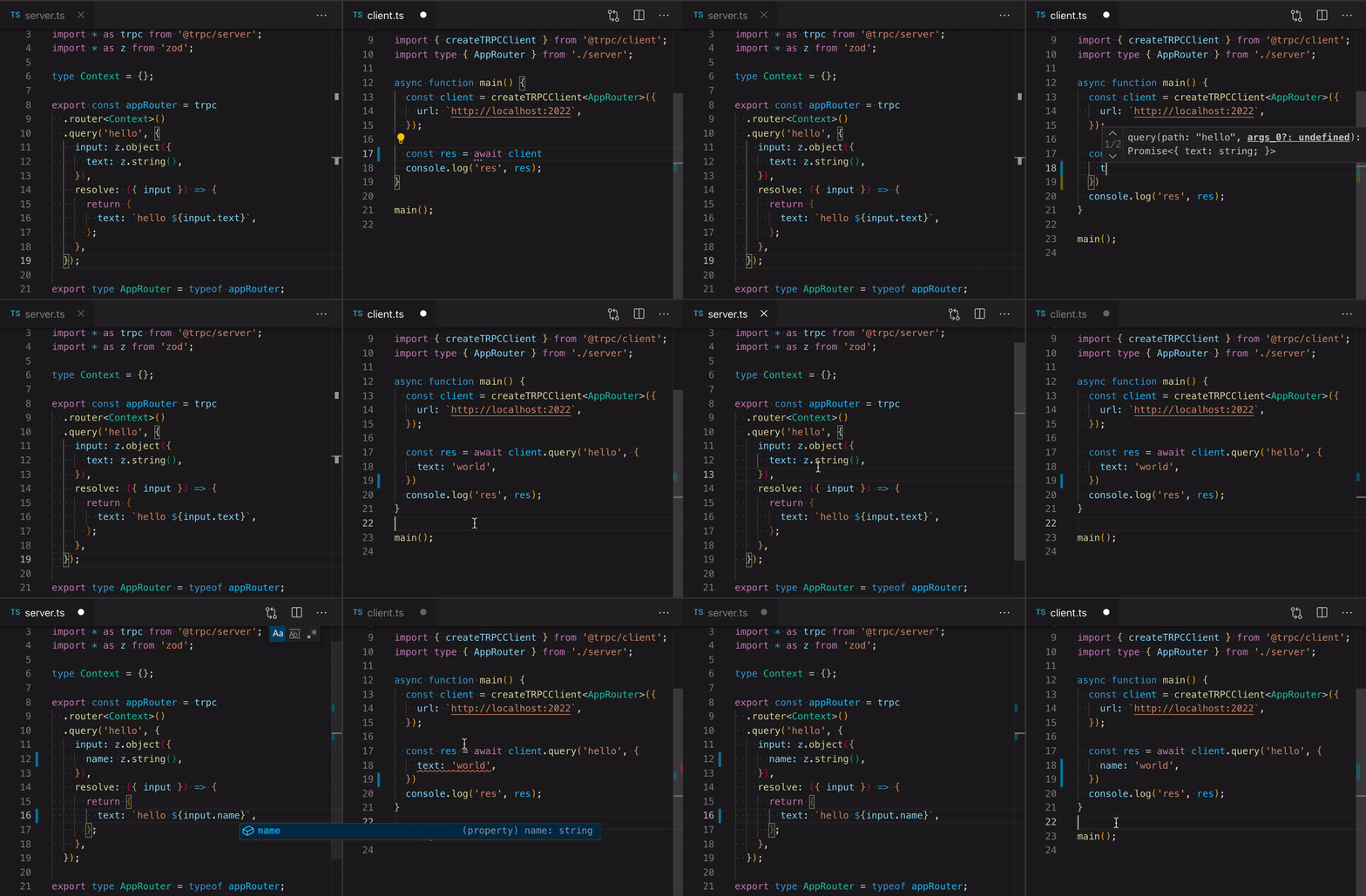
这是调用 tRPC 端点与客户端的实际效果: 示例动图

我为 React 开发了专属库 (@trpc/react),基于优秀的 react-query 实现。而客户端库 (@trpc/client) 可独立于 React 运行(如需开发 Svelte/Vue/Angular/[其他]版本库,欢迎联系我!)

整个过程无需代码生成,你可以轻松集成到现有 Next.js/CRA/Express 项目中。

示例

这是一个名为 hello 的 tRPC 过程(即端点),接收 string 类型参数:

tsx
const appRouter = trpc.router().query('hello', {
input: z.string().optional(),
resolve: ({ input }) => {
return {
text: `hello ${input ?? 'world'}`,
};
},
});
export type AppRouter = typeof appRouter;
tsx
const appRouter = trpc.router().query('hello', {
input: z.string().optional(),
resolve: ({ input }) => {
return {
text: `hello ${input ?? 'world'}`,
};
},
});
export type AppRouter = typeof appRouter;

以下是使用该数据的类型安全客户端:

tsx
import type { AppRouter } from './server';
async function main() {
const client = createTRPCClient<AppRouter>({
url: `http://localhost:2022`,
});
const result = await client.query('hello', '@alexdotjs');
console.log(result); // --> { text: "hello @alexdotjs" }
}
main();
tsx
import type { AppRouter } from './server';
async function main() {
const client = createTRPCClient<AppRouter>({
url: `http://localhost:2022`,
});
const result = await client.query('hello', '@alexdotjs');
console.log(result); // --> { text: "hello @alexdotjs" }
}
main();

这就是实现类型安全的全部所需! result 的类型由后端函数返回内容自动推断。输入数据也会通过验证器进行类型推断,因此数据可直接安全使用——实际上,输入数据_必须_通过验证器处理(tRPC 默认支持 zod/yup/自定义验证器)。

这是上面示例的 CodeSandbox 链接:https://githubbox.com/trpc/trpc/tree/main/examples/standalone-server (请查看终端输出而非页面预览!)

等等?我这是在把后端代码导入前端?——其实不然

虽然看起来像共享代码,但服务器到客户端实际没有传输任何代码逻辑;TypeScript 的 import type "[...] 仅导入用于类型注解的声明,它会被完全擦除,运行时不留痕迹。"——这是 TypeScript 3.8 的特性,详见官方文档

整个过程无需代码生成,只要能在客户端共享服务端类型(推荐使用 monorepo),现在就能集成到你的应用中。

但这只是开始!

前文提到的 React 库,在组件中这样使用数据:

tsx
const { data } = trpc.useQuery(['hello', '@alexdotjs']);
tsx
const { data } = trpc.useQuery(['hello', '@alexdotjs']);

即可在客户端获得类型安全的数据。

现有项目(支持 Express/Next.js 适配器)可立即集成 tRPC,兼容 CRA 且支持 React Native。它甚至不依赖 React,如需开发 Svelte 或 Vue 版本库,请联系我。

数据变更如何处理?

变更操作(mutation)与查询同样简单,底层实现相同,仅作为语法糖区别暴露:变更发起 HTTP POST 请求而非 GET 请求。

这里有个稍复杂的数据库使用示例,取自我们的 TodoMVC 示例 todomvc.trpc.io / https://github.com/trpc/trpc/tree/main/examples/next-prisma-todomvc

tsx
const todoRouter = createRouter().mutation('add', {
input: z.object({
id: z.string().uuid(),
data: z.object({
completed: z.boolean().optional(),
text: z.string().min(1).optional(),
}),
}),
async resolve({ ctx, input }) {
const { id, data } = input;
const todo = await ctx.task.update({
where: { id },
data,
});
return todo;
},
});
tsx
const todoRouter = createRouter().mutation('add', {
input: z.object({
id: z.string().uuid(),
data: z.object({
completed: z.boolean().optional(),
text: z.string().min(1).optional(),
}),
}),
async resolve({ ctx, input }) {
const { id, data } = input;
const todo = await ctx.task.update({
where: { id },
data,
});
return todo;
},
});

React 用法 如下所示:

tsx
const addTask = trpc.useMutation('todos.add');
return (
<>
<input
placeholder="What needs to be done?"
onKeyDown={(e) => {
const text = e.currentTarget.value.trim();
if (e.key === 'Enter' && text) {
addTask.mutate({ text });
e.currentTarget.value = '';
}
}}
/>
</>
)
tsx
const addTask = trpc.useMutation('todos.add');
return (
<>
<input
placeholder="What needs to be done?"
onKeyDown={(e) => {
const text = e.currentTarget.value.trim();
if (e.key === 'Enter' && text) {
addTask.mutate({ text });
e.currentTarget.value = '';
}
}}
/>
</>
)

暂时到此为止

总之,正如我所说,我只是想开个头。还有很多功能值得探索:

  • 为请求创建上下文(用于注入用户数据到解析器)- 链接

  • 路由中间件支持 - 链接

  • 路由合并(你可能不希望所有后端逻辑都在单个文件中)- 链接

  • 通过 @trpc/next 适配器实现极简服务端渲染 - 链接

  • 类型安全的错误格式化 - 链接

  • 数据转换器(支持 Date/Map/Set 跨网络传输)- 链接

  • React Query 辅助工具

如需快速入门,可参考 Next.js 入门指南 中的示例项目。

在 Twitter 关注我获取最新动态!